Pages available in the client presentation builder
Last updated: November 20, 2026
There are a variety of pages available in your presentation builder that allow you to tell a compelling story to your client—whether you’re illustrating the basics or walking through more advanced strategies.
To add a page, click the + next to Pages. Then choose from four categories: General, Household details, AI-generated or Education.
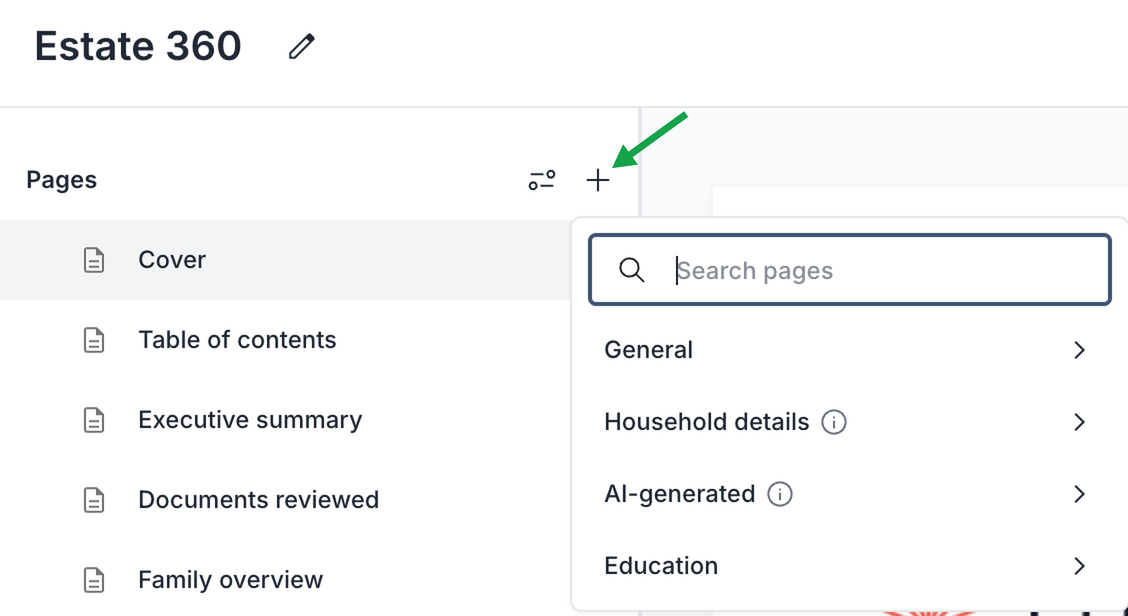
General
Cover page - The cover page will feature your firm’s logo by default. You can click directly into the page to update the title and add any body text you’d like. When you click into the body text area, a text editor will appear with formatting options.
Table of contents - The table of contents is dynamic and will update automatically as you add, delete, and rearrange pages in your presentation.
Custom page - The custom page lets you add any additional content that supports your client conversation—like next steps, recommendations, or personalized notes. It includes a header and a free-text body, with formatting options.
Divider Page - The divider page marks the start of a new section of the presentation. It shows the section title so the audience can follow along as the discussion moves from one topic to the next.
Firm disclaimer and Luminary disclaimer - Disclaimer pages let you include your own custom disclosures, as well as Luminary’s standard disclaimer outlining key assumptions. This feature must be enabled by a firm administrator—see below for details.
📄 Legal disclaimers for presentations
Household Details - Linked to the clients underlying data
Estate Details:
Balance sheet - The balance sheet displays what your client owns and how they own it with ownership structure defined across the top row and assets and asset classes on the left column.
Entities list - The entities list shows all active entities in the household, their asset location, and current net value. A visual at the top breaks down total net worth into in estate vs. out of estate assets, including family and charitable giving when relevant.
Insights - The Luminary Insights pages allow you to pull in the identified insights for a given household to speak to either completed and/or active insights identified for your client. See below for more information on how to use this page.
📄 Insights page in the presentation builderLiabilities - The Liabilities page lists all outstanding liabilities in the household, such as loans and notes between entities. For each one, it shows the name, the lender, the debtor, payment details, payment type and the outstanding balance.
Professional team - The professional team page pulls in the names of individuals listed under the Client Team tab on the People page of your client’s profile. It’s a great way to highlight key members of your client’s advisory team.
Note: This page only includes individuals from the Client Team tab—it does not include fiduciaries listed within individual trusts.
Visualizations
Beneficiary report - The Beneficiary Report page shows what each beneficiary is set to receive under the client’s estate plan. It breaks down which trusts, entities or gifts each person or charity benefits from.
Entity overview - Entity overview pages let you highlight key details about a specific entity, along with a visual diagram showing how it distributes assets or for business entities, how it’s owned. See below for more on how to use this page.
📄 Entity overview page in the presentation builder
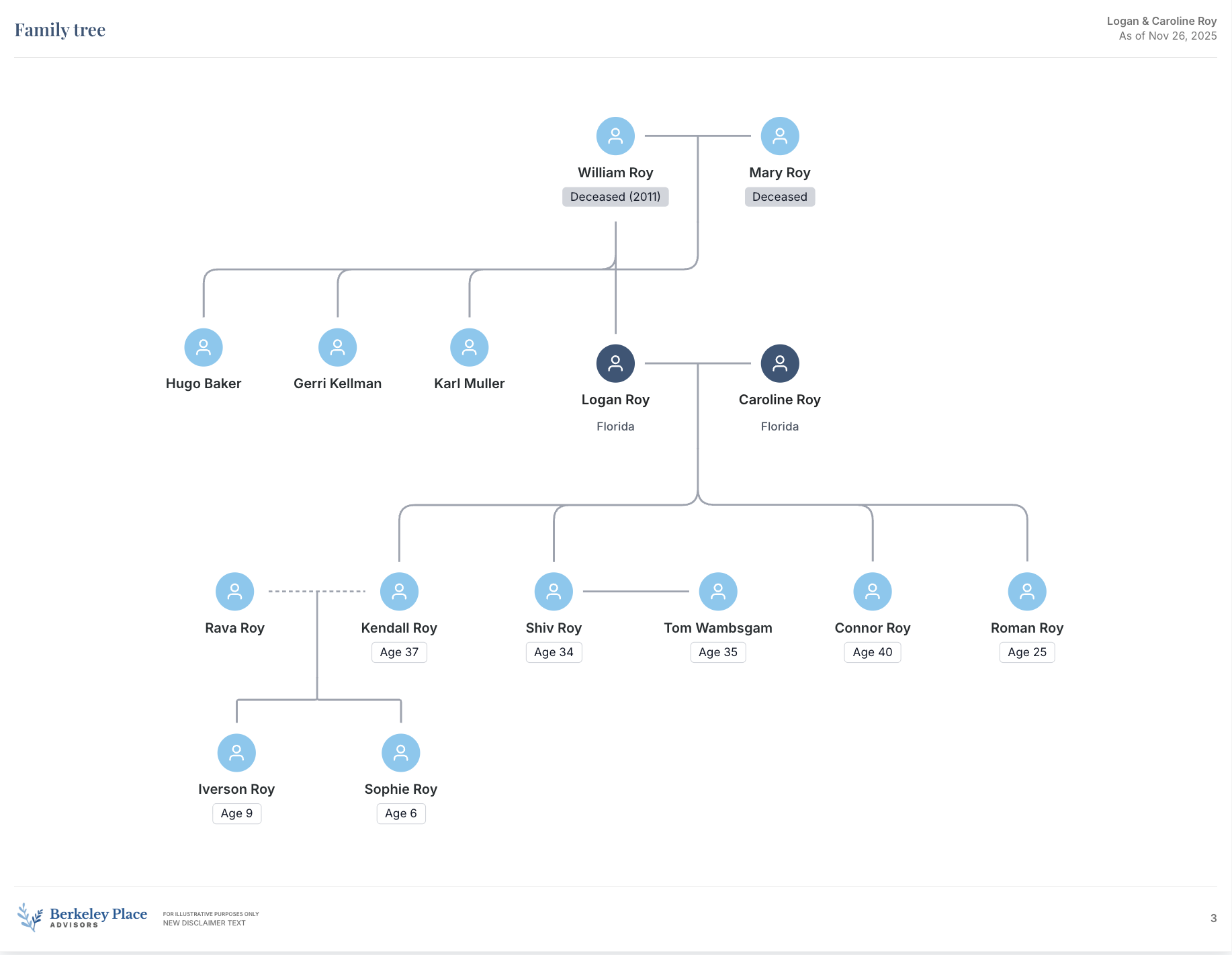
Family tree - The family tree page displays family architecture based on the relationships defined when creating the individuals in the household. This diagram is customizable and allows you to add notes and personal details to help better contextualize your client’s family dynamics in the context of their estate plan.
Ownership diagram - The ownership diagram displays how various entities are owned across your client’s household. It’s especially helpful for clients with multiple businesses or nested ownership structures, and can also illustrate beneficial relationships to entities—like someone who currently has access to a trust. Any customizations made in-app will carry over to the presentation.
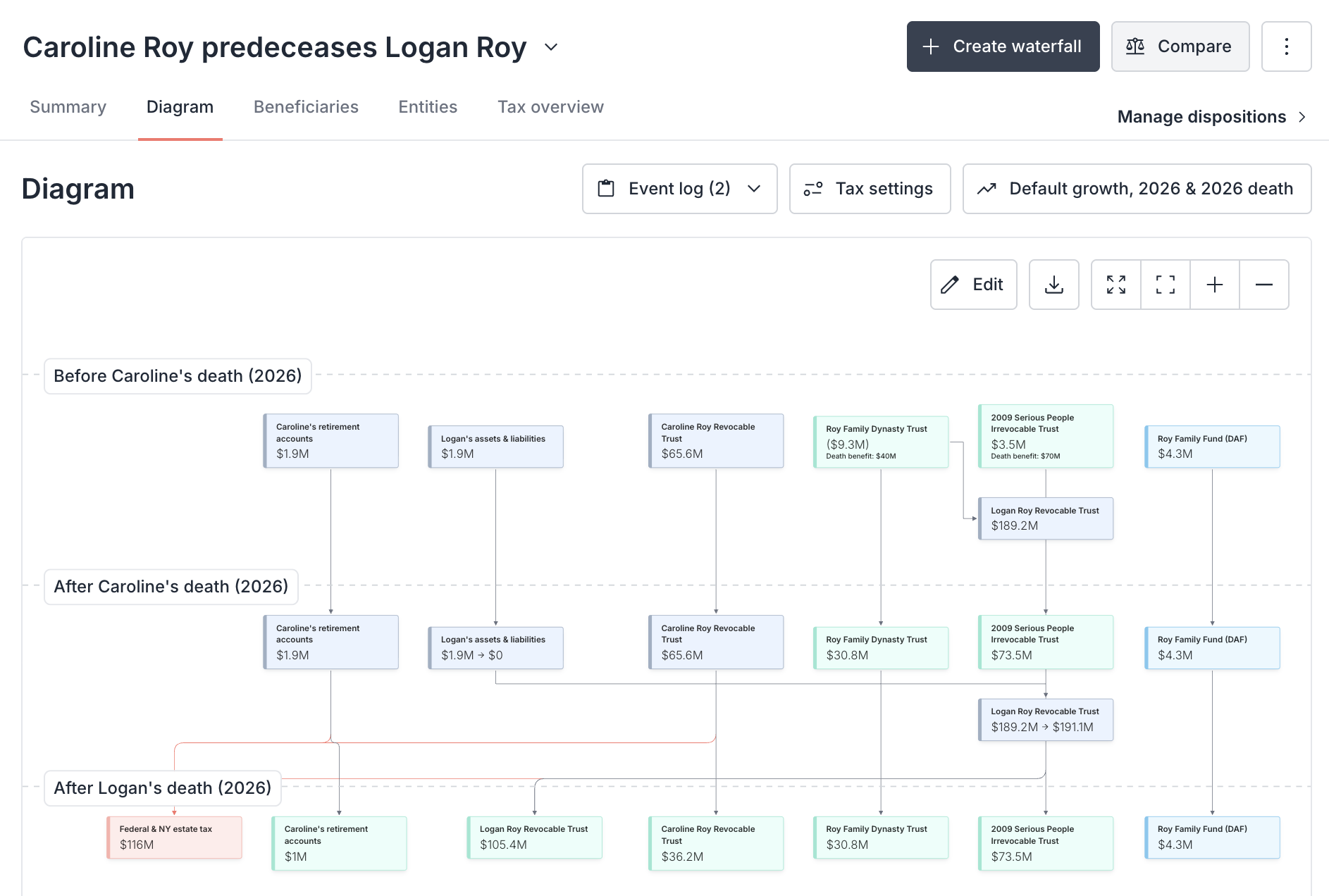
Waterfall overview - The waterfall overview page displays your estate waterfall diagram along with the summary, assumptions, and tax overview for a selected scenario. This page is available to Luminary Pro customers only. See below for more information on how to use this page.
📄 Waterfall overview page in the presentation builder
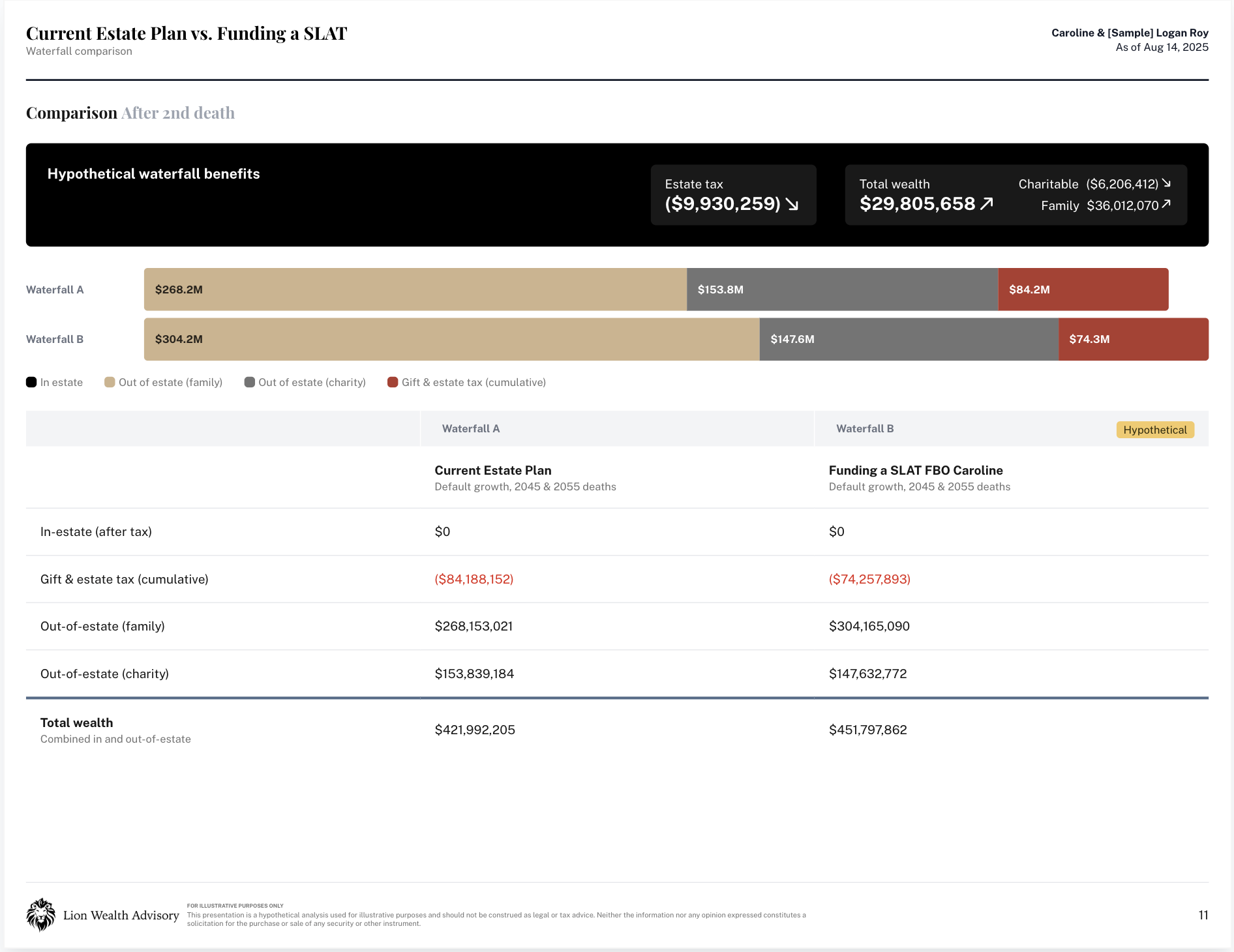
Waterfall comparison - The waterfall comparison page lets you show side-by-side outcomes for multiple scenarios you’ve modeled in Luminary. It’s a great way to highlight differences in tax impact, family and charitable giving, or how assumptions like growth rates and death years affect the plan. See below for more on how to use this page.
📄 Waterfall comparison page in the presentation builder
AI-generated
Document summaries - Document summary pages let you include any summarized document you’ve uploaded for your client. Edits or customizations you made to the summary will carry over into the presentation.
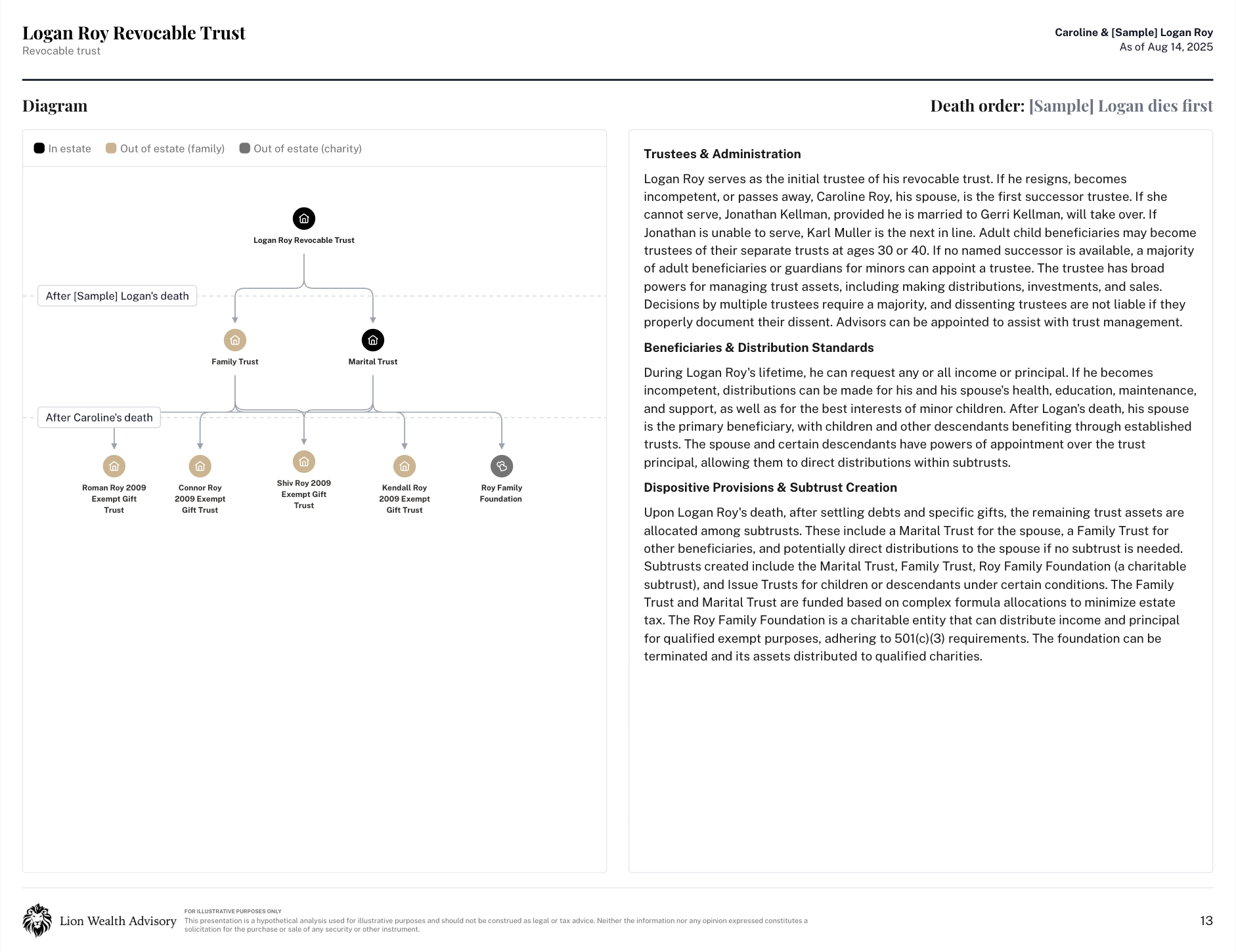
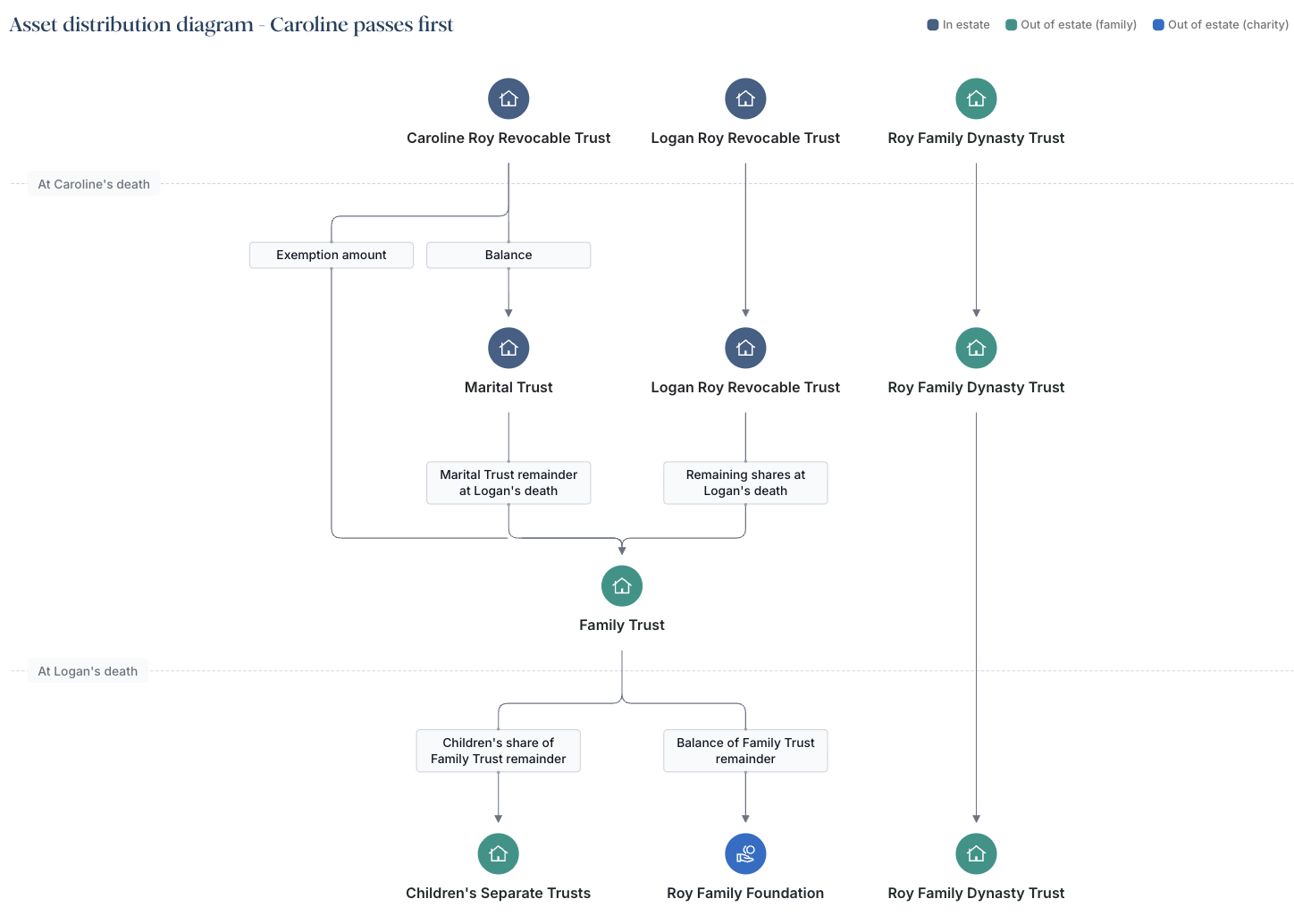
Asset Distribution Diagram - The Asset Distribution Diagram is an editable visual showing how the client’s assets flow at death, from the client to trusts, individuals and charities. You can adjust the diagram so it fits how you want to present the plan.
Asset Distribution Detail - The Asset Distribution Detail page gives a written breakdown of how assets are distributed under the client’s estate plan. It covers specific gifts, what happens to the remaining estate, and which trusts or beneficiaries receive each share.
Business Overview - The Businesses Overview page summarizes each business entity in the client’s estate, including its name and entity type. It covers the entity’s governing jurisdiction, agreement date and purpose, along with each owner’s percentage stake. It also explains how the business is managed and how decisions are voted on, what limits apply to transferring ownership interests, and how the entity can be dissolved.
Documents Reviewed -The Documents Reviewed page lists every client document that was reviewed to build the presentation. Each document appears with the date it was created, so it’s clear which versions the analysis is based on.
Family Overview - The Family Overview page summarizes the client’s family members and their relationships, drawn from the client’s documents. It gives context on the people involved in the estate plan, such as spouses, children and other beneficiaries.
Trust Overview - The Trusts Overview pages summarize each trust in the client’s estate plan, grouped into trusts that exist during life and trusts created at the first or second death. For each trust, the page shows its name and type, along with who created it or what triggers its creation and which governing instrument establishes it.
Healthcare Directives - The Healthcare Directives page summarizes the client’s healthcare documents, including who is named to make medical decisions on their behalf.
Power of Attorney - The Power of Attorney page summarizes the client’s power of attorney documents, including who is named as agent and any successor agents. It also outlines the scope of authority granted and when it takes effect.
Observations & Opportunities - The Observations & Opportunities page highlights key findings from the review of the client’s documents. It points out possible gaps, issues or planning opportunities to talk through with the client.
Education
Educational material - Our educational material includes a growing library of pages you can add to your presentation to help frame client conversations and explain complex strategies. Topics range from why estate planning matters and an overview of estate taxes to strategies like SLATs, CRTs, and GRATs.